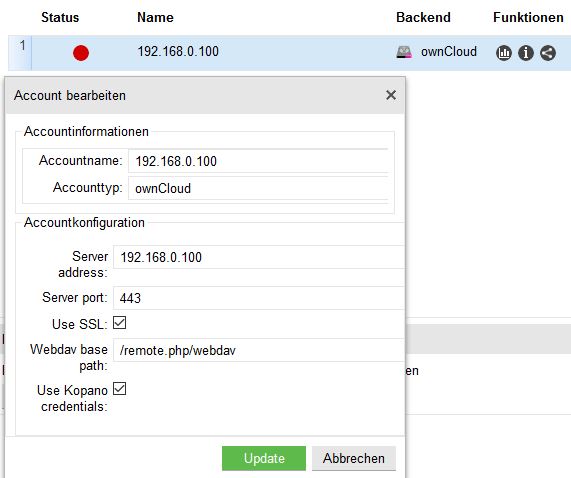
And also the FQDNS doesn’t work:
Edit: FQDNS changed to ‘example.com’
Accountinformationen
Accountname: FQDNS
Accounttyp: ownCloud
Accountkonfiguration
Server address: example.com
Server port: 443
Use SSL: Yes
Webdav base path: /remote.php/webdav
Use Kopano credentials: Yes
I tried also without “use kopano credentials” and gave user and password, but the red lamp is on.
Accountinformationen
Accountname: webdav
Accounttyp: Webdav
Accountkonfiguration
Server address: IP
Server port: 80
Use SSL: No
Webdav base path: /nextcloud/remote.php/dav
Use Kopano credentials: Yes
you are using two different paths in your examples. When using the “owncloud” type you say that your Nextcloud is setup at https://domain/, but when going the WebDav way its at http://domain/nextcloud.
Giving the ip (when using https) naturally won’t work since since your ssl certificate is very likely not created with the ip as one of the sans and therefore verification of the certificate will fail.
OK, I got it, that the IP and SSL won’t work with the Let’s encrypt certificate, because the IP isn’t mentioned in the certificate.
I tested so many configurations and took only a few screenshots.
But I tested all the following configurations:
Type		Server	Port	SSL	Webdav base path		Username	Password	Kopano credentials	Status
ownCloud	IP	80	No	/remote.php/webdav		User		********	No			Red
ownCloud	IP	443	Yes	/remote.php/webdav		User		********	No			Red
ownCloud	IP	80	No	/remote.php/webdav		-		-		Yes			Red
ownCloud	IP	443	Yes	/remote.php/webdav		-		-		Yes			Red
ownCloud	FQDNS	80	No	/remote.php/webdav		User		********	No			Red
ownCloud	FQDNS	443	Yes	/remote.php/webdav		User		********	No			Red
ownCloud	FQDNS	80	No	/remote.php/webdav		-		-		Yes			Red
ownCloud	FQDNS	443	Yes	/remote.php/webdav		-		-		Yes			Red
Webdav		IP	80	No	/remote.php/webdav		User		********	No			Red
Webdav		IP	443	Yes	/remote.php/webdav		User		********	No			Red
Webdav		IP	80	No	/remote.php/webdav		-		-		Yes			Red
Webdav		IP	443	Yes	/remote.php/webdav		-		-		Yes			Red
Webdav		FQDNS	80	No	/remote.php/webdav		User		********	No			Red
Webdav		FQDNS	443	Yes	/remote.php/webdav		User		********	No			Red
Webdav		FQDNS	80	No	/remote.php/webdav		-		-		Yes			Red
Webdav		FQDNS	443	Yes	/remote.php/webdav		-		-		Yes			Red
Webdav		IP	80	No	/nextcloud/remote.php/dav	User		********	No			Red
Webdav		IP	443	Yes	/nextcloud/remote.php/dav	User		********	No			Red
Webdav		IP	80	No	/nextcloud/remote.php/dav	-		-		Yes			Red
Webdav		IP	443	Yes	/nextcloud/remote.php/dav	-		-		Yes			Red
Webdav		FQDNS	80	No	/nextcloud/remote.php/dav	User		********	No			Green
Webdav		FQDNS	443	Yes	/nextcloud/remote.php/dav	User		********	No			Green
Webdav		FQDNS	80	No	/nextcloud/remote.php/dav	-		-		Yes			Green
Webdav		FQDNS	443	Yes	/nextcloud/remote.php/dav	-		-		Yes			Green
ownCloud	FQDNS	80	No	/nextcloud/remote.php/dav	User		********	No			Green
ownCloud	FQDNS	443	Yes	/nextcloud/remote.php/dav	User		********	No			Green
ownCloud	FQDNS	80	No	/nextcloud/remote.php/dav	-		-		Yes			Green
ownCloud	FQDNS	443	Yes	/nextcloud/remote.php/dav	-		-		Yes			Green
OK, so I got it working with the Webdav and FQDNS and the modified webdav path, not the standard one.
But how can I get it working with the owncloud plugin?
Edit: So, I got it also working with the owncloud and the modified path.
You have to overwrite the default path (/remote.php/webdav) with this one: /nextcloud/remote.php/dav
Type: ownCloud
Accountinformationen
Accountname: nextcloud and FQDNS
Accounttyp: ownCloud
Accountkonfiguration
Server address: example.com
Server port: 443
Use SSL: Yes
Webdav base path: /nextcloud/remote.php/dav
Use Kopano credentials: Yes
Type: Webdav
Accountinformationen
Accountname: nextcloud and FQDNS
Accounttyp: Webdav
Accountkonfiguration
Server address: example.com
Server port: 443
Use SSL: Yes
Webdav base path: /nextcloud/remote.php/dav
Use Kopano credentials: Yes
It’s working with and without SSL and also with and without “use the Kopano credentials”.
So the lamp is green now, but the files aren’t loading. Kopano files says “loading files”.
But they aren’t loading.
It looks like a permission problem, the user is a standard Kopano user (no Admin, etc.). Do I have to set a special permission / add it to a group in UCS?
Actual the only group is domain users (standard) and in the tab Kopano “Kopano-User”.
Yes, I’d say thats quite natural. The plugin has no knowledge itself where you installed Nextcloud/Owncloud and makes the assumption that you installed it in the root of its own domain and not in a subpath.
For this one I would suggest to post over at the Kopano forum, as there the WebApp developers also check posts. When posting there please also include the exact version you are using as well as logs from the Webserver.