Scenario
In this article, we will discuss best practices for create, import, and synchronize users into Nubus for Kubernetes. Here are the options we offer, along with brief explanations.
Recommended User Management in Nubus for Kubernetes
Manual creation in UMC
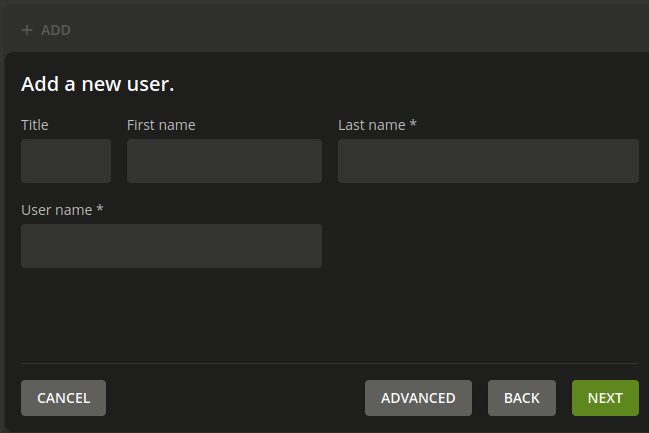
Users can be manually created through the Univention Management Console (UMC). An administrator logs into the UMC, navigates to the user settings module, and fills out a form to create a new user.
UDM REST API with curl
Users can be created using the UDM (Univention Directory Manager) REST API with curl. See the documentation for a detailed explanation on Nubus Documentation: Create a user object. Follow these steps to create a new user:
- Activate the ingress rule of UDM REST API (default value: false):
nubusUdmRestApi:
  ingress:
    enabled: true
- Next we load the deployment variables and get the
user_template.jsonas a blueprint:
source variables
export MODULE="users/user"
curl --user Administrator:${ADMINISTRATOR_PASSWORD} --request GET --header "Accept: application/json" https://portal.${NUBUS_HOSTNAME}/univention/udm/${MODULE}/add | python3 -c 'import sys, json; template = json.load(sys.stdin); template = {key:value for key, value in template.items() if not key.startswith("_")}; json.dump(template, sys.stdout, indent=4)' > user_template.json
- Copy the file to
user.jsonand edit the file. This way, the template can always be used for the next new user. At a minimum fill inusername,lastnameandpassword. A command might look like this:
curl --user Administrator:${ADMINISTRATOR_PASSWORD} --request POST --header "Accept: application/json" --header "Content-Type: application/json" --data @user.json https://portal.${NUBUS_HOSTNAME}/univention/udm/${MODULE}/
{"dn": "uid=Testusername,cn=users,dc=example,dc=dev", "uuid": "5cbc0900-0c8c-1040-93a6-73d5731ae40e", "_links": {"curies": [{"name": "udm", "templated": true, "href": "https://portal.my-nubus.example.dev/univention/udm/relation/{rel}"}]}}
Please note: To meet specific security requirements in your environment, the user “Administrator” must not be used! In this case, the commands must be changed accordingly!
UDM REST API Client
The UDM REST API Client allows to interact with the Univention Directory Manager (UDM) REST API in a programmatic way. By utilizing the repository at python-udm-rest-api-client, you can easily authenticate, create, read, update, and delete users and other directory objects with simple method calls. This client simplifies the integration process by handling the underlying API requests and responses, making it easier to manage user data programmatically.
Self Service
The Self Service feature in Nubus allows users to manage their own account settings, such as updating personal information and changing passwords, enhancing user autonomy and reducing administrative workload. According to the Nubus documentation: self-service, while users can access these self-service functionalities, it’s important to note that self-registration is currently not implemented in Nubus for Kubernetes (See Bug 58403). This means that users must still rely on administrators to create their accounts, but they can take advantage of the available self-service options for ongoing account management.
Federation with external IAM systems
Federation with external IAM systems in Nubus allows for seamless integration and synchronization of user data from existing identity providers, by using Keycloak. By following the guidelines in the Nubus documentation: ad-hoc-provisioning, administrators can configure ad-hoc provisioning to automatically create and manage users in Nubus for Kubernetes based on the information from the external IAM system, ensuring that user identities are consistently maintained across platforms. This setup enhances security and simplifies user management by leveraging existing identity infrastructures.
Import from external IAM
The Import from external IAM feature in Nubus for Kubernetes enables the migration of user data from existing identity management systems into the Univention Nubus environment. By utilizing the instructions provided in the Nubus documentation: directory-importer, administrators can configure the Directory Importer to extract user information from external sources, such as LDAP directories, and import it into Nubus, facilitating a smooth transition and ensuring that user identities are accurately reflected in the new system. This process streamlines user management and enhances operational efficiency by consolidating user data.
SCIM Server
The SCIM Server feature in Nubus for Kubernetes allows for standardized user management through the System for Cross-domain Identity Management (SCIM) protocol, enabling seamless integration with external applications. According to the Nubus documentation: SCIM Server, administrators can configure the SCIM Server to handle user provisioning, updates, and deletions, allowing external systems to interact with Nubus for Kubernetes for user management tasks. This capability enhances interoperability and simplifies the synchronization of user data across different platforms, ensuring consistency and reducing administrative overhead.
SCIM Client
The SCIM Client in Nubus for Kubernetes facilitates the synchronization of user data from external identity management systems to the Nubus environment using the SCIM protocol. As outlined in the Nubus documentation: SCIM Client, administrators can configure the SCIM Client to send user creation, update, and deletion requests to the Nubus SCIM Server, ensuring that user information remains consistent across platforms. This integration streamlines user management processes and enhances the overall efficiency of identity synchronization.
User Management in UCS and UCS@School
The following features are not part of Nubus for Kubernetes. But we only want to mention them to have a good list, how you can import users into UCS and UCS@School.
UCS - AD Connector
The AD Connector in Nubus facilitates the integration of Active Directory (AD) with the Univention Corporate Server environment, allowing for seamless synchronization of user accounts and groups between the two systems. As outlined in the AD Connector documentation, administrators can set up the connector to automatically import and manage user data from AD, ensuring that user identities are consistent across platforms. This integration streamlines user management processes and enhances security by leveraging existing AD infrastructure for authentication and authorization.
UCS - AD Takeover
The AD Takeover feature in UCS allows organizations to transition from an existing Active Directory (AD) environment to a Univention-based system with Samba and LDAP, while preserving user data and configurations. As detailed in the AD Takeover documentation, this process involves synchronizing user accounts, groups, and permissions from the original AD to the UCS environment, ensuring a smooth migration with minimal disruption. This capability enables organizations to leverage the benefits of the UCS platform while maintaining continuity in user management and access control.
UCS@School
UCS@School provides a comprehensive solution for managing educational environments, allowing administrators to utilize the UCS@School Kelvin REST API for seamless integration and management of school-related data. As detailed in the UCS@School Kelvin REST API documentation, this API enables the creation, retrieval, and modification of user and class information programmatically. Additionally, the CSV Import feature allows for bulk importing of user data from CSV files, simplifying the onboarding process for new students and staff by efficiently populating the system with necessary information.
Questions?
If you’re not sure whether the recommendations will fit into your scenario, please ask your Professional Services contact person, or create a new topic referencing this article.