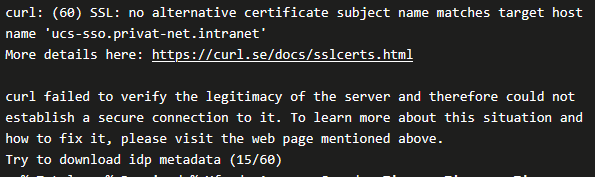
Hi - during the update on the primary system I noticed the following message:

I would assume this is an error message - but by using the system diagnostic all is in GREEN.
Anyone any idea?
Thank you in advance
Hi - during the update on the primary system I noticed the following message:
I would assume this is an error message - but by using the system diagnostic all is in GREEN.
Anyone any idea?
Thank you in advance
I have the same issue.
Hi Pepe,
the SSL certificate ucs.sso.private-net.intranet cannot be found.
Possible solutions include:
THX George for sharing.
Based on the fact that I’m not a pro in this area - I would like to understand a bit better the dependencies.
First of all - the same message arrived during the update on the secondary-system. But also there - UCS system check is fine - nor errors.
The article is talking about a root certificate and computer certificates.
In the update log “ucs-sso.privat-net.intranet” has been named. Is “ucs-sso.privat-net.intranet” now the root certificate or just one computer certificate?
I used
univention-certificate dump -name ucs-sso.privat-net.intranet
to check if the certificate is valid:
Dump certificate: ucs-sso.privat-net.intranet
Certificate:
    Data:
        Version: 3 (0x2)
        Serial Number: 3 (0x3)
        Signature Algorithm: sha256WithRSAEncryption
        Issuer: C = DE, ST = DE, L = DE, O = privat-net, OU = Univention Corporate Server, CN = Univention Corporate Server Root CA (ID=970NP1Yj), emailAddress = ssl@privat-net.intranet
        Validity
            Not Before: Jan 19 15:58:31 2024 GMT
            Not After : Jan 17 15:58:31 2029 GMT
        Subject: C = DE, ST = DE, L = DE, O = privat-net, OU = Univention Corporate Server, CN = ucs-sso.privat-net.intranet, emailAddress = ssl@privat-net.intranet
        Subject Public Key Info:
            Public Key Algorithm: rsaEncryption
                Public-Key: (2048 bit)
                Modulus:
                    00:c1:0a:fc:48:19:20:4d:cf:d8:e3:a1:47:fd:46:
                    47:60:e0:ae:a2:a7:ef:0e:88:00:7b:bd:43:42:73:
                    87:65
                Exponent: 65537 (0x10001)
        X509v3 extensions:
            X509v3 Basic Constraints:
                CA:FALSE
            X509v3 Subject Key Identifier:
                DE:13:8E:95:71:EA:67:1A:56:6C:AC:03:39:53:DE:0D:4A:4F:8D:F8
            X509v3 Authority Key Identifier:
                keyid:25:3E:DF:11:63:95:ED:E2:51:01:35:11:61:B9:04:4B:23:1E:05:50
                DirName:/C=DE/ST=DE/L=DE/O=privat-net/OU=Univention Corporate Server/CN=Univention Corporate Server Root CA (ID=970NP1Yj)/emailAddress=ssl@privat-net.intranet
                serial:21:D3:CF:CD:D1:D7:76:F5:E5:BB:9A:DB:C1:35:79:24:DD:1E:B4:6F
            X509v3 Key Usage:
                Digital Signature, Non Repudiation, Key Encipherment
            X509v3 Subject Alternative Name:
                DNS:ucs-sso.privat-net.intranet, DNS:ucs-sso
    Signature Algorithm: sha256WithRSAEncryption
    Signature Value:
        a5:9d:82:0b:49:bd:b5:37:ad:cf:3b:e2:ec:28:4a:9d:92:ae:
        4c:98:53:2f:90:b1:e8:d1:48:bb:b4:ad:4b:a1:2b:2b:6f:39:
        a1:db:b3:b3
… and for me it looks OK (keep in mind - I’m not a pro).
I checked as well with Firefox and Firefox marked it as valid - it is juts selfsigned and not official one.
So how can I check if it is OK or not?
I had a look as well at “curl - SSL CA Certificates”.
Here it is mentioned:
If the remote server uses a self-signed certificate, if you do not install a CA cert store, if the server uses a certificate signed by a CA that is not included in the store you use or if the remote host is an impostor impersonating your favorite site, the certificate check fails and reports an error.
That sounds for me - because it is not an official certificate, that the message is correct and I don’t have any issues.
Anyone who can explain it for non pro’s?
Thank you in advance
HI - I’m still facing the same issues.
I just did the update to version 5.2-2 errata164.
Any help or feedback is welcome.
Please keep in mind - I’m not a pro - so please keep it simple for me 
HI - I’m still facing the same issues.
I just did the update to version 5.2-3 errata283.
I can not believe, that I’m the only one.
A simple and easy to understand feedback would be wonderful.
THX
Hi - within the update from 5.2-1 errata 62 to errata 118 I noticed the first time the below message in the update log.
Since that time, I’m checking the update log very carefully - and the message pops up every time.
I updated today to the latest version 5.3.x and it is still there.
Every time you check the system diagnostic, no errors are visible.
Can anyone explain what is going on here?
A simple guide to get this fixed - it there is the need to get it fixed - would be very helpful.
PS: I’m aware that also other (like passt) are facing this issue - but haven’t seen any solution yet.
Thank you in advance