Password Reset Fails in UMC for Student Accounts Due to Password Complexity
Problem:
When a teacher attempts to reset a student’s password through the UMC (Univention Management Console) using a password that does not meet the configured password complexity requirements, the process fails with an internal server error.
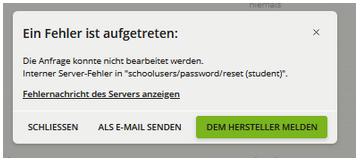
The following error message appears in the UMC interface:
An error occurred:
The request could not be processed.
Internal server error in "schoolusers/password/reset (student)".
The traceback in the UMC log shows:
Interner Server-Fehler in "schoolusers/password/reset (student)".
Request: schoolusers/password/reset (student)

Traceback (most recent call last):
  File "/usr/lib/python3/dist-packages/univention/management/console/modules/schoolusers/__init__.py", line 167, in password_reset
    _password_reset(request, ldap_user_write)
  File "/usr/lib/python3/dist-packages/univention/management/console/modules/schoolusers/__init__.py", line 160, in _password_reset
    user.modify()
  File "/usr/lib/python3/dist-packages/univention/admin/handlers/users/user.py", line 1288, in modify
    return super(object, self).modify(*args, **kwargs)
  File "/usr/lib/python3/dist-packages/univention/admin/handlers/__init__.py", line 693, in modify
    dn = self._modify(modify_childs, ignore_license=ignore_license, response=response, serverctrls=serverctrls)
  File "/usr/lib/python3/dist-packages/univention/admin/handlers/__init__.py", line 1398, in _modify
    ml = self._ldap_modlist()
  File "/usr/lib/python3/dist-packages/univention/admin/handlers/users/user.py", line 1580, in _ldap_modlist
    self._check_password_complexity(pwhistoryPolicy)
  File "/usr/lib/python3/dist-packages/univention/admin/handlers/users/user.py", line 1677, in _check_password_complexity
    raise univention.admin.uexceptions.pwToShort(_('The password is too short, at least %d characters needed!') % (password_minlength,))
univention.admin.uexceptions.pwToShort: Fehler in der Passwort-Richtlinie: Das Passwort ist zu kurz, mindestens 10 Zeichen erforderlich!
Root Cause:
This issue is caused by a combination of:
- Password complexity requirements not being met (e.g., password too short).
- A follow-up error triggered by a missing
/etc/ldap.secretfile when the UDM tries to re-read LDAP credentials during exception handling.
This behavior is tracked in the following bug report:
https://forge.univention.org/bugzilla/show_bug.cgi?id=58189
Solution:
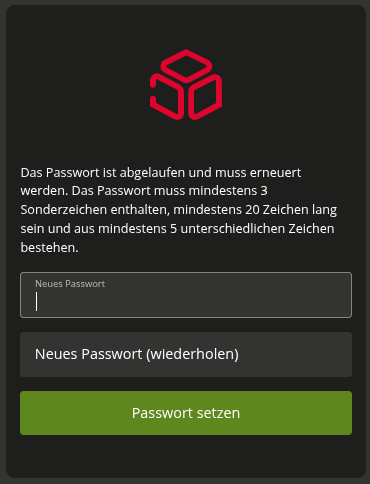
To avoid confusion for UMC users (e.g., teachers), you can define a custom password complexity message that clearly communicates the required password rules before the password reset attempt.
Set the following UCR variable on the school server (school replica) and replace the text with your desired password policy message:
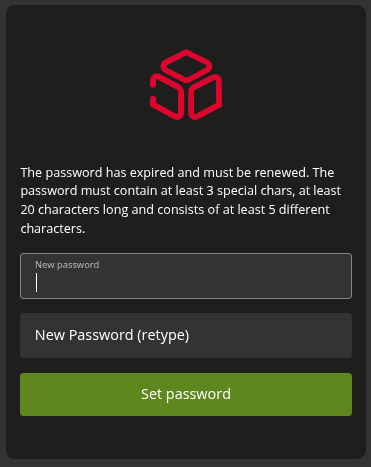
ucr set umc/login/password-complexity-message/en='The password must contain at least 3 special chars, at least 20 characters long and consist of at least 5 different characters.'
After applying the setting, restart the UMC service:
systemctl restart univention-management-console-server.service
This ensures the new complexity message is displayed to users in the UMC, helping them choose compliant passwords and preventing the error from occurring.
Additional:
German version:
-
ucr set umc/login/password-complexity-message/de='Das Passwort muss mindestens 3 Sonderzeichen enthalten, mindestens 20 Zeichen lang sein und aus mindestens 5 unterschiedlichen Zeichen bestehen.' -
systemctl restart univention-management-console-server.service