UCS@school 5.2: User Import Fails with “May not be a Windows reserved name”
Problem
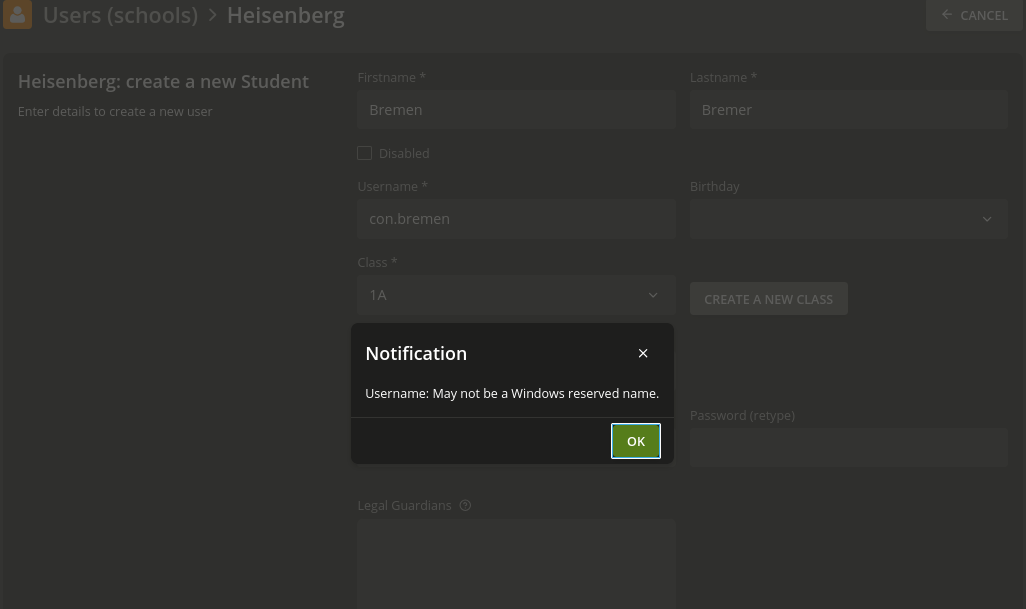
When importing user lists via the UCS@school import mechanism, or when manually creating a school user through the Univention Management Console (UMC), the operation fails with a ValidationError if the username matches a name reserved by Windows.
Example error (user import)
|  con.bremen | ValidationError when adding ImportStudent(
    name='con.bremen',
    school='Heisenberg',
    dn='uid=con.bremen,cn=schueler,cn=users,ou=Heisenberg,dc=miro,dc=intranet',
    old_dn=None)
  (source_uid:bremen-student record_uid: bremen2016-01-04):
  {'name': ['May not be a Windows reserved name']}
  ValidationError({'name': ['May not be a Windows reserved name']})
The same error message May not be a Windows reserved name also appears when creating a school user directly through the UMC.
Investigation
Why this error occurs
Windows reserves a set of special device names that cannot be used as filenames or, by extension, as usernames in Windows-integrated environments. These reserved names include:
CON,PRN,AUX,NUL,COM0–COM9,LPT0–LPT9
The check applies to the prefix of the username up to a dot separator. In the example above, the username con.bremen begins with con., which triggers the reserved name check for CON.
When was this check introduced?
The Windows username validation check was first introduced as an opt-in feature in UCS@school 5.0 v4 (Bug #56152), controlled by the UCR variable ucsschool/validation/username/windows-check. At that time:
- If the join script found no existing invalid usernames, it set the variable to
yesautomatically. - If invalid usernames already existed, the variable was left unset (effectively disabled).
- Administrators could explicitly set the variable to
noto bypass the check.
The release notes for UCS@school 5.0 v4 already announced that as of UCS@school 5.2, disabling this check would no longer be supported.
What changed in UCS@school 5.2?
With UCS@school 5.2 v1, the default value of ucsschool/validation/username/windows-check was changed to yes. The validation is now active by default on all UCS@school systems, regardless of whether the environment includes Windows clients. Additionally, usernames violating Windows naming conventions are now reported as critical errors in the System Diagnostic UMC module.
The rationale: usernames that violate Windows naming conventions can cause login failures and functional errors when users authenticate against or interact with Microsoft Windows clients. Preventing such usernames at creation time avoids difficult-to-diagnose downstream issues.
Root Cause
The UCR variable ucsschool/validation/username/windows-check was changed to default to yes in UCS@school 5.2 v1.
Source: UCS@school 5.2 v1 Changelog (released 2025-03-11)
“The default value for the UCR variable
ucsschool/validation/username/windows-checkhas been changed toyes. User names should not contain names reserved by Windows. […] As of UCS@school 5.2, incorrect user names, including ones automatically generated by naming schemes, are prevented by default.”
Solution
Important: Disabling this check is explicitly discouraged by Univention. Using Windows-reserved names as usernames can cause authentication and functional errors when users log on to or use Microsoft Windows clients. Evaluate carefully whether this workaround is appropriate for your environment.
If the use of Windows-reserved names is nonetheless required, the validation check can be disabled as follows.
Step 1 Disable the check on the Primary Directory Node
ucr set ucsschool/validation/username/windows-check=no
Step 2 Restart the Services
systemctl restart ucs-school-import-http-api.service \
                 ucs-school-import-celery-worker.service \
                 univention-management-console-server.service \
                 univention-directory-manager-rest.service
After completing both steps, user accounts with previously blocked usernames can be created successfully. The following example confirms a user con.atlas was created without error:
root@ucs5primary:~# udm users/user list --filter uid=con.atlas | grep -E 'DN|username'
DN: uid=con.atlas,cn=schueler,cn=users,ou=Heisenberg,dc=miro,dc=intranet
username: con.atlas
Long-term recommendation
Rather than disabling the validation, consider updating the username generation scheme in the UCS@school import configuration (typically located under /var/lib/ucs-school-import/configs/) to produce usernames that do not begin with a Windows-reserved name. This permanently eliminates the conflict without compromising Windows client compatibility.
Existing users with non-compliant usernames can be identified using the System Diagnostic module in the UMC, which reports them as critical errors as of UCS@school 5.2.