Problem: Resolve “encryption type arcfour-hmac used for authentications is deprecated” Warning on Ubuntu Clients
Description
When users attempt to log in to Ubuntu (24.04) clients joined to a UCS domain, they receive the following warning:
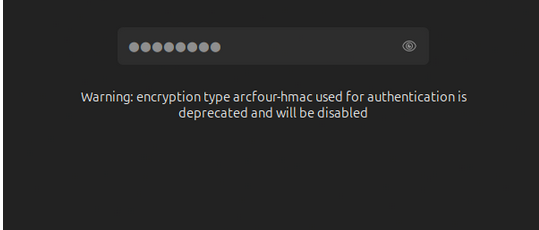
Warning: encryption type arcfour-hmac used for authentications is deprecated and will be disabled.
Background
The warning "Warning: encryption type arcfour-hmac used for authentication is deprecated and will be disabled" indicates that the arcfour-hmac-md5 (RC4) encryption type configured in krb5.conf is outdated. Newer distributions like Ubuntu 24.04, which use MIT Kerberos, display this warning because RC4 is considered cryptographically insecure and will eventually be removed.
When arcfour-hmac-md5 is removed from the client configuration, authentication fails likely because:
- The affected user accounts in Samba 4 (Active Directory-compatible mode) only have this encryption type set in their
msDS-SupportedEncryptionTypesattribute. - The
msDS-SupportedEncryptionTypesattribute is not set at all, and thus the default value, which includesarcfour-hmac-md5, is used.
Solution
This issue requires a two-pronged approach involving both the UCS server (Samba/AD) and the Ubuntu clients, and importantly, an adjustment of the Domain Functional Level.
Step 1: Enforce Stronger Encryption Types on the UCS Server
By default, Samba/AD might still offer deprecated encryption types. We need to disable RC4 system-wide.
-
Set secure encryption types via UCR:
On your UCS master, open a terminal and execute the following UCR command. This removes the outdated RC4 cipher from the system-wide defaults.ucr set "samba/kdc_default_domain_supported_enctypes"="aes256-cts-hmac-sha1-96-sk,aes256-cts-hmac-sha1-96,aes128-cts-hmac-sha1-96" -
Restart Samba:
After setting the UCR variable, restart the Samba service to apply the changes./etc/init.d/samba restart
Step 2: Remove Deprecated Ciphers from Client-Side krb5.conf
Adjust the krb5.conf file on your Ubuntu clients to remove arcfour-hmac-md5.
-
Edit
krb5.conf:
Open thekrb5.conffile (typically located at/etc/krb5.conf) on your Ubuntu client and modify thedefault_tkt_enctypesandpermitted_enctypeslines as follows:default_tkt_enctypes = aes256-cts-hmac-sha1-96 aes128-cts-hmac-sha1-96 des-cbc-crc des-cbc-md5 des-cbc-md4 des3-hmac-sha1 des3-cbc-sha1 permitted_enctypes = aes256-cts-hmac-sha1-96 aes128-cts-hmac-sha1-96 des-cbc-crc des-cbc-md5 des-cbc-md4 des3-hmac-sha1 des3-cbc-sha1
Note: Ensure to remove
allow_weak_crypto=trueif it is present in yourkrb5.conf, as it is no longer necessary with modern cipher sets and can undermine security.
- Reboot the Ubuntu client
Step 3: Verify and Potentially Raise Domain Functional Level
Even after configuring secure ciphers, authentication might still fail if the Domain Functional Level is too low. A Windows 2003 Forest and Domain Functional Level, as is currently the case, prevents Samba/AD from generating AES keys for Kerberos internally. This is a critical prerequisite for disabling RC4 successfully.
Your current lowest Domain Controller supports Windows 2008 R2, allowing you to raise the Functional Level without replacing DCs.
-
Check current Domain and Forest Functional Levels:
On your UCS master, open a terminal and execute the following command to display the current functional levels:samba-tool domain level showVerify that both the Domain Functional Level and Forest Functional Level are set to at least 2008 R2.
Domain and forest function level for domain 'DC=ucs5schoolhejne,DC=intranet'

Forest function level: (Windows) 2008 R2
Domain function level: (Windows) 2008 R2
Lowest function level of a DC: (Windows) 2008 R2
If your output also shows 2008 R2, feel free to continue with Step 4, otherwise follow the instructions in the article linked directly below.
-
Raise Domain and Forest Functional Levels (if necessary):
If the functional levels are not at 2008 R2 or higher, you must raise them to proceed. This change is irreversible. For detailed instructions on how to raise the functional levels, please refer to the Univention article:
Note: Ensure that all Domain Controllers in your environment support the target functional level before proceeding with the raise operation.
Step 4: Reset Passwords for Accounts
After raising the Domain Functional Level, new AES keys are only generated when a user or machine changes its password. Therefore, you need to reset passwords for affected accounts.
-
Reset a user’s password (test account recommended):
You can do this via the Univention Management Console (UMC) or using thesamba-toolcommand:samba-tool user setpassword <USERNAME> -
Renew Kerberos keys in UCS 5.x Systems:
For renew Kerberos Keys, you can use:
chgkrbtgtpass.py (2.5 KB)
python3 chgkrbtgtpass.py
#!/usr/bin/env python3
#
# Copyright (C) Matthieu Patou <mat@matws.net>  2010
# Copyright (C) Andrew Bartlett <abartlet@samba.org>  2015
#
#
# This program is free software; you can redistribute it and/or modify
# it under the terms of the GNU General Public License as published by
# the Free Software Foundation; either version 3 of the License, or
# (at your option) any later version.
#
# This program is distributed in the hope that it will be useful,
# but WITHOUT ANY WARRANTY; without even the implied warranty of
# MERCHANTABILITY or FITNESS FOR A PARTICULAR PURPOSE.  See the
# GNU General Public License for more details.
#
# You should have received a copy of the GNU General Public License
# along with this program.  If not, see <http://www.gnu.org/licenses/>.


__docformat__ = "restructuredText"


import optparse
import sys
# Allow to run from s4 source directory (without installing samba)
sys.path.insert(0, "bin/python")

import samba.getopt as options
from samba.credentials import DONT_USE_KERBEROS
from samba.auth import system_session
from samba import param
from samba.provision import find_provision_key_parameters
from samba.upgradehelpers import (get_paths,
                                  get_ldbs,
                                  update_krbtgt_account_password)

# --- Start der Fehlerbehandlung ---
try:
    parser = optparse.OptionParser("chgkrbtgtpass [options]")
    sambaopts = options.SambaOptions(parser)
    parser.add_option_group(sambaopts)
    parser.add_option_group(options.VersionOptions(parser))
    credopts = options.CredentialsOptions(parser)
    parser.add_option_group(credopts)

    opts = parser.parse_args()[0]

    lp = sambaopts.get_loadparm()
    smbconf = lp.configfile
    creds = credopts.get_credentials(lp)
    creds.set_kerberos_state(DONT_USE_KERBEROS)


    paths = get_paths(param, smbconf=smbconf)
    session = system_session()

    ldbs = get_ldbs(paths, creds, session, lp)
    ldbs.startTransactions()

    update_krbtgt_account_password(ldbs.sam)
    ldbs.groupedCommit()

    # --- Erfolgsmeldung ---
    print("Das Skript wurde erfolgreich ausgeführt: Das Passwort des krbtgt-Kontos wurde aktualisiert.")

except Exception as e:
    # --- Verständliche Fehlerausgabe ---
    # Gibt die Fehlermeldung auf dem Standard-Fehlerkanal aus.
    print(f"FEHLER: Das Skript konnte nicht erfolgreich ausgeführt werden.", file=sys.stderr)
    print(f"Ursache: {e}", file=sys.stderr)
    sys.exit(1) # Beendet das Skript mit einem Fehlerstatus
Step 5: Test Authentication and Verify Kerberos Tickets
After performing all the above steps, test the login on the Ubuntu client.
-
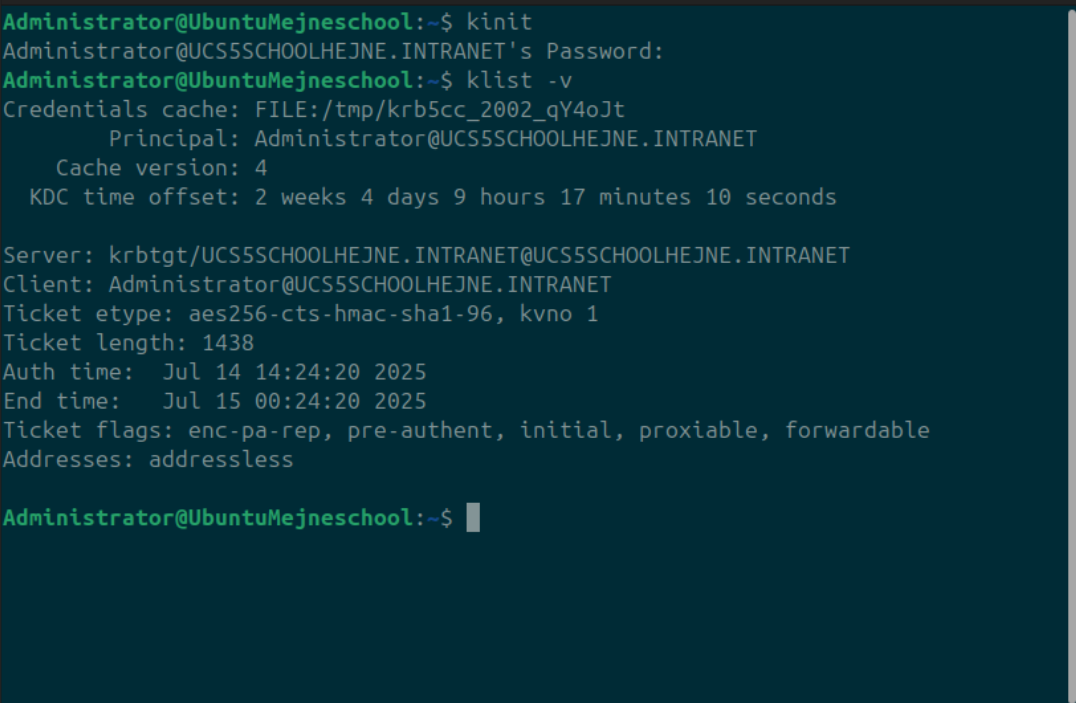
Initiate a Kerberos ticket:
On the Ubuntu client, open a terminal and run:kinitEnter the password for the test user you reset.
-
Verify Kerberos tickets:
Check the details of the acquired Kerberos tickets with:klist -vThe output should no longer show on Ticket etype
arcfour-hmacentrie and the authentication should be successful without the deprecation warning.
Further Information
For a comprehensive understanding of Samba’s deprecation of the rc4-hmac cipher and related aspects, please refer to the detailed Univention article: