Problem description
With the most recent upgrades for Windows 10 and by default in Windows 11, the ability for non-administrative accounts to install printer drivers on the small side was blocked. This prevents malicious code from being installed.
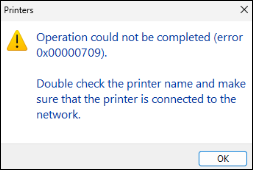
Therefore, user accounts on Windows clients receive the following message when attempting to install printer drivers:
Workarounds for test purposes
Attention: Both workarounds are security-relevant and should only be used for testing purposes. Do not use this in productive environments!
Workaround I
With local or domain Admin Account you can change the behaviour in the windows registry. Navigate to HKEY_LOCAL_MACHINE\Software\Policies\Microsoft\Windows NT\Printers\PointAndPrint and change the DWORD value to 1. An reboot isn’t needed regarding Microsoft.
After that non administrative accounts can Point and Print again the old way.
Workaround II
The following GPOs must be configured as a domain administrator, linked and rolled out with the desired objects in the directory service.
Use the MMC or other tools and create a new GPO or change an existing one.
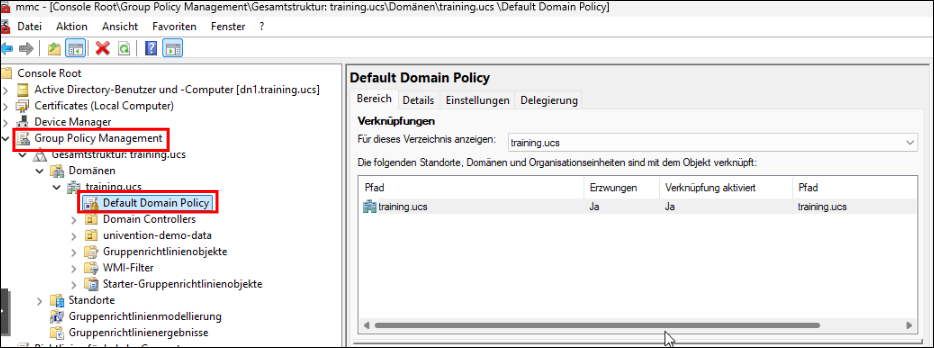
Depending on the desired test result, the following combination of printer guidelines worked with Windows 11 per version 24H2.
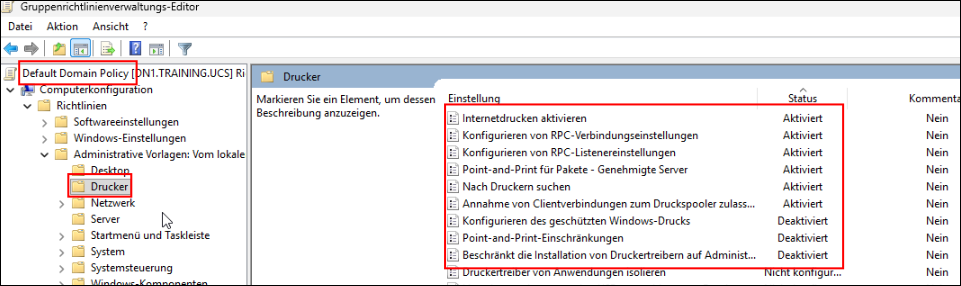
Warning: Not every one of these GPO settings needs to be used. Depending on the panel, try the combination that makes sense for it.
Quo vadis
Fed by Microsoft and other global manufacturers, it is likely that MOPRIA will establish itself as the standard.
What impact does this have on CUPS?
The CUPS project no longer supports conventional drivers as of version 3 and then only works without driver. This also eliminates the great altleist of the implementation of printer drivers in this project.
Zusammenfassung
Dieser Text wird ausgeblendet
Sources