How to: Apply Fine-Grained Password Policies (PSO) for a Specific Group in UCS 5.2
Summary
This article describes how to configure fine-grained password policies (PSO) in a UCS 5.2 Active Directory domain so that **only users in a specific region (for example, France) are required to follow stricter password rules in compliance with standards such as ISO 27001.
The password policy will apply only to a defined group of users and will trigger password expiry notifications and forced changes through Windows logon dialogs via Samba/Active Directory integration.
Background
Fine-Grained Password Policies (PSOs) allow administrators to assign different password and lockout settings to specific users or groups within an Active Directory domain.
In UCS, Samba acts as the AD-compatible domain controller, managing password and authentication policies for Windows clients. Unlike UCS’s own password checks (via pwdCheckModule or passwordhistory), Windows password change enforcement is handled solely by Samba, meaning Samba PSOs must be used.
Key Concepts
-
PSOs can be linked only to users or groups, not directly to an OU.
-
When multiple PSOs apply, the lowest precedence number determines which one takes effect.
-
Windows clients detect expired passwords through Samba attributes such as
pwdLastSetandmaxPwdAge.
When the password is expired, Windows shows:
“Your password has expired and must be changed before you can log on.”
Prerequisites
- UCS domain running version 5.2-x
- Samba 4.21 or later (included in UCS 5.2)
- Administrative shell access to a domain controller
Investigation:
Why Fine-Grained Password Policies?
For compliance reasons (e.g., ISO 27001), organizations often require different password aging and complexity settings for specific departments or countries.
Example requirements:
- Minimum length: 12 characters
- Complexity: enabled (letters, numbers, symbols)
- Password history: 10
- Minimum age: 1 day
- Maximum age: 60 days
- Account lockout after 5 failed attempts
Usage: samba-tool domain passwordsettings pso create [options]
Creates a new Password Settings Object (PSO).

PSOs are a way to tailor different password settings (lockout policy,
minimum password length, etc) for specific users or groups.

The psoname is a unique name for the new Password Settings Object.
When multiple PSOs apply to a user, the precedence determines which PSO
will take effect. The PSO with the lowest precedence will take effect.

For most arguments, the default value (if unspecified) is the current
domain passwordsettings value. To see these values, enter the command
'samba-tool domain passwordsettings show'.

To apply the new PSO to user(s) or group(s), enter the command
'samba-tool domain passwordsettings pso apply'.


Options:
  -h, --help            show this help message and exit
  --complexity=COMPLEXITY
                        The password complexity (on | off).
  --store-plaintext=STORE_PLAINTEXT
                        Store plaintext passwords where account have 'store
                        passwords with reversible encryption' set (on | off).
  --history-length=HISTORY_LENGTH
                        The password history length (<integer>).
  --min-pwd-length=MIN_PWD_LENGTH
                        The minimum password length (<integer>).
  --min-pwd-age=MIN_PWD_AGE
                        The minimum password age (<integer in days>). Default
                        is domain setting.
  --max-pwd-age=MAX_PWD_AGE
                        The maximum password age (<integer in days>). Default
                        is domain setting.
  --account-lockout-duration=ACCOUNT_LOCKOUT_DURATION
                        The length of time an account is locked out after
                        exceeding the limit on bad password attempts (<integer
                        in mins>). Default is domain setting
  --account-lockout-threshold=ACCOUNT_LOCKOUT_THRESHOLD
                        The number of bad password attempts allowed before
                        locking out the account (<integer>). Default is domain
                        setting.
  --reset-account-lockout-after=RESET_ACCOUNT_LOCKOUT_AFTER
                        After this time is elapsed, the recorded number of
                        attempts restarts from zero (<integer in mins>).
                        Default is domain setting.
  -H URL, --URL=URL     LDB URL for database or target server
  --color=always|never|auto
                        use colour if available (default: auto)

  Credentials Options:
    --simple-bind-dn=DN
                        DN to use for a simple bind
    --password=PASSWORD
                        Password
    -U USERNAME, --username=USERNAME
                        Username
    -W WORKGROUP, --workgroup=WORKGROUP
                        Workgroup
    -N, --no-pass       Don't ask for a password
    --ipaddress=IPADDRESS
                        IP address of server
    -P, --machine-pass  Use stored machine account password
    --use-kerberos=desired|required|off
                        Use Kerberos authentication
    --use-krb5-ccache=KRB5CCNAME
                        Kerberos Credentials cache
    -A AUTHFILE, --authentication-file=AUTHFILE
                        Authentication file
    -k KERBEROS, --kerberos=KERBEROS
                        DEPRECATED: Migrate to --use-kerberos

  Samba Common Options:
    -s FILE, --configfile=FILE
                        Configuration file
    -d DEBUGLEVEL, --debuglevel=DEBUGLEVEL
                        debug level
    --option=OPTION     set smb.conf option from command line
    --realm=REALM       set the realm name

  Version Options:
    -V, --version       Display version number
Important Behavior Notes
-
The domain default policy applies to all users unless overridden by a PSO with higher priority (lower precedence number).
-
UCS LDAP password modules do not affect Windows login behavior; only Samba policies do.
-
Password expiry and “change required” prompts on Windows clients depend on:
pwdLastSet(timestamp)maxPwdAge(in PSO)- and the resulting
STATUS_PASSWORD_MUST_CHANGEmessage from Samba.
Implementation Steps
1. Create a Group for French Users
Create a new group in the Univention Management Console (UMC) or via CLI:
udm groups/group create \
  --position "cn=groups,dc=univention,dc=intranet" \
  --set name=frankreich-user \
  --set description="Users located in France subject to stricter password policy"
or
udm groups/group create --position ou=Frankreich-OU,dc=univention,dc=intranet --set name=Testgoup --set description="Testgroup for the OU"
Output:
Object created: cn=Testgoup,ou=Frankreich-OU,dc=univention,dc=intranet
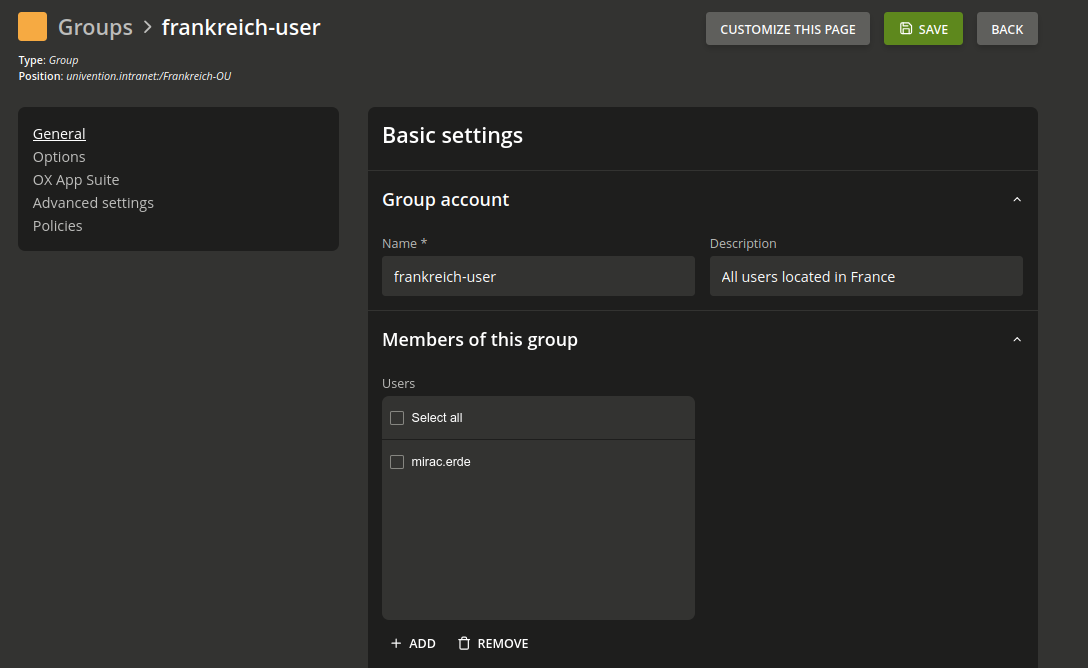
Add all relevant users to this group.
You can to that in the UMC/Groups Module and add the users to the group you need.
2. Create a Password Settings Object (PSO)
Use samba-tool to create a PSO with your required password and lockout rules.
samba-tool domain passwordsettings pso create "Frankreich-Policy" 10 \
  --min-pwd-length=12 \
  --complexity=on \
  --history-length=10 \
  --max-pwd-age=60 \
  --min-pwd-age=1 \
  --account-lockout-threshold=5 \
  --account-lockout-duration=30 \
  --reset-account-lockout-after=15
Explanation
- “Frankreich-Policy” – Arbitrary PSO name
- 10 – Precedence value (lower = higher priority)
- Other parameters define password complexity, aging, and lockout thresholds.
Precedence recommendations:
| Scope | Recommended Range | Example |
|---|---|---|
| Critical/Admin accounts | 1–5 | Admin Policy |
| Countries/Regions | 10–49 | France Policy |
| Departments | 50–99 | HR Policy |
| Global fallback | 100 | Default Domain Policy |
3. Verify PSO Creation
samba-tool domain passwordsettings pso list
Example output:
Precedence | PSO name
------------------------------------
10         | Frankreich-Policy
Show PSO details:
samba-tool domain passwordsettings pso show Frankreich-Policy
Example:
Precedence (lowest is best): 10
Password complexity: on
Store plaintext passwords: off
Password history length: 10
Minimum password length: 12
Minimum password age (days): 1
Maximum password age (days): 60
Account lockout duration (mins): 30
Account lockout threshold (attempts): 5
Reset account lockout after (mins): 15
4. Apply the PSO to the Target Group
Link the policy to the group containing all French users:
samba-tool domain passwordsettings pso apply Frankreich-Policy frankreich-user
Output:
PSO 'Frankreich-Policy' applied to 'frankreich-user'
5. Force Password Change at Next Login (Optional Test)
You can force a single user to change their password at the next Windows login:
udm users/user modify \
 --dn "uid=mirac.erde,cn=users,dc=univention,dc=intranet"\
 --set pwdChangeNextLogin=1
Alternatively:
samba-tool user setpassword testuser --must-change-at-next-login
Afterward, Windows 11 will display:
“Your password has expired and must be changed before you can log on.”
Additonal:
Bash Script to modify the users in group “frankreich-user” and set pwdChangeNextLogin=1
#!/bin/bash
# -----------------------------------------------------------------------------
# Script Name: force_password_change_fr_users.sh
# Purpose    : Force password change at next login for all members of the
#              group "frankreich-user" in UCS domain.
# UCS Version: 5.2+
# Author     : (Your Name)
# -----------------------------------------------------------------------------

GROUP_DN="cn=frankreich-user,ou=Frankreich-OU,dc=univention,dc=intranet"

echo "Fetching members of group: $GROUP_DN ..."
# Hole alle Benutzer-DNs aus der Gruppe
USER_DNS=$(udm groups/group list --filter "cn=frankreich-user" | awk '/^  users: /{print $2}')

if [ -z "$USER_DNS" ]; then
    echo "❌ No users found in group $GROUP_DN."
    exit 1
fi

echo "✅ Found $(echo "$USER_DNS" | wc -l) user(s) in group."

# Schleife über alle Benutzer
for DN in $USER_DNS; do
    echo "Processing user: $DN"
    udm users/user modify --dn "$DN" --set pwdChangeNextLogin=1
    if [ $? -eq 0 ]; then
        echo " → Successfully set pwdChangeNextLogin=1 for $DN"
    else
        echo " → ⚠️ Failed to modify $DN"
    fi
done

echo "✅ Done. All users processed."
Paste the script:
nano /root/force_password_change_fr_users.sh
Make the script excutable:
chmod +x /root/force_password_change_fr_users.sh
Execute the bash script:
bash /root/force_password_change_fr_users.sh
Output:
Fetching members of group: cn=frankreich-user,ou=Frankreich-OU,dc=univention,dc=intranet ...
✅ Found 1 user(s) in group.
Processing user: uid=mirac.erde,cn=users,dc=univention,dc=intranet
Object modified: uid=mirac.erde,cn=users,dc=univention,dc=intranet
 → Successfully set pwdChangeNextLogin=1 for uid=mirac.erde,cn=users,dc=univention,dc=intranet
✅ Done. All users processed.
Check:
udm users/user list --filter uid=test.user | grep pwdChangeNextLogin
Ouput:
pwdChangeNextLogin: 1
Troubleshooting
-
No prompt appears on Windows login
→ Ensure user is a member of the correct group and that PSO precedence is lower than any other applied policy. -
Cannot apply PSO to OU
→ Samba does not support PSO assignment to OUs. Use groups instead. -
Check active password settings for a user:
samba-tool user show <username>Look for attributes related to password aging.
Summary
| Task | Command / Action |
|---|---|
| Create group | udm groups/group create ... |
| Create PSO | samba-tool domain passwordsettings pso create ... |
| List PSOs | samba-tool domain passwordsettings pso list |
| Show PSO details | samba-tool domain passwordsettings pso show Frankreich-Policy |
| Apply PSO to group | samba-tool domain passwordsettings pso apply Frankreich-Policy frankreich-user |
| Force change next login | udm users/user modify ... --set pwdChangeNextLogin=1 |
References
- Univention Manual – Password settings for Windows clients
- Microsoft Documentation – Fine-Grained Password Policy in AD DS