Hey,
all of this is extremely strange. Can you please do the following in order to find out more why it doesn’t continue after it starts booting:
[ol][li]Start the machine.[/li]
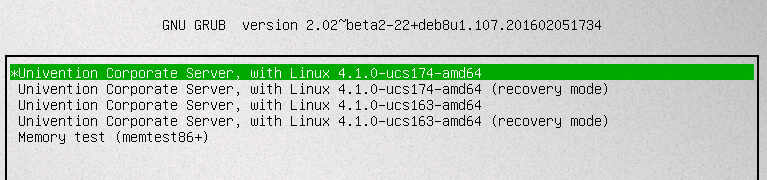
[li]As soon as the “grub” boot menu appears (see attached screenshot “grub-main-menu.png” for what that should look like; it’s the smaller one of the two screenshots) hit one of the arrow keys on your keyboard. It doesn’t matter which one; what matters is that grub will stop the automatic boot process when you press any key.[/li]
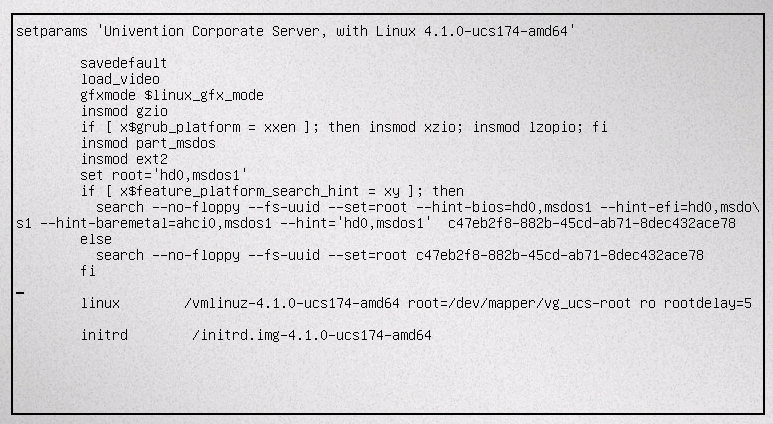
[li]Next make sure the first entry is still selected and press the “e” key (“e” for “edit entry”). A new screen should appear displaying the details of what grub will do with the entry. It should look similar to the attached “grub-edit-entry.png” (the larger of the two attached pictures).[/li]
[li]Now navigate to the line starting with “linux …”. Please remove the strings “quiet”, “loglevel=0” and “splash” from this line. The result should look similar to the aforementioned “grub-edit-entry.png” where I’ve already removed those strings from the line.[/li]
[li]Next boot this entry by pressing the F10 key. A list of text entries should be displayed, and the boot process should hang somewhere again.[/li]
[li]Finally take a screenshot (e.g. with your phone) of the screen when it won’t change anymore and post that screenshot here.[/li][/ol]
Thanks.
Kind regards,
mosu