Problem
Removing or reinstalling a Replica under a new hostname can leave obsolete NS/SOA references. If an in-zone name server loses its address record, a later zone load can fail.
Solution
1. Update DNS references first
Create a backup. Before removing anything, ensure that the remaining DNS server has valid A/AAAA records and answers authoritatively over UDP and TCP (see Verification).
Open UMC → Domain → DNS → All DNS zones. Edit every affected forward and reverse zone, including zones not linked to the old computer object.
Under General → Name server, replace the obsolete entry with a valid remaining DNS server, then Save. Use fully qualified names ending in a dot. Never remove the last NS without a replacement. The first entry supplies the SOA primary name server (MNAME).
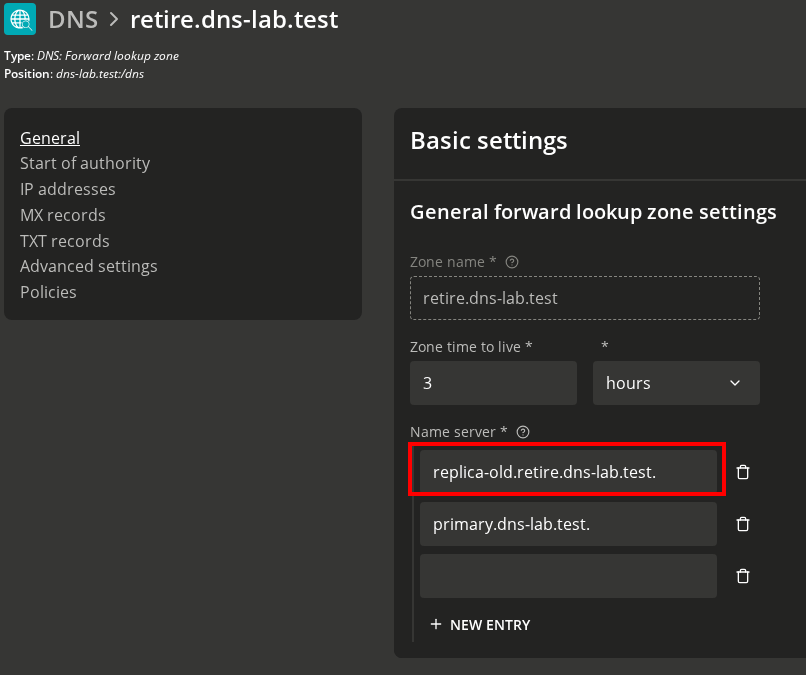
Before:
replica-old.retire.dns-lab.test. is still listed.
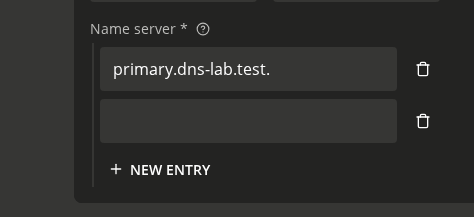
After:
primary.dns-lab.test. remains.
2. Remove the old computer object
Migrate other services and update DHCP/client DNS settings, forwarders, SRV records and aliases as needed before retiring the old server.
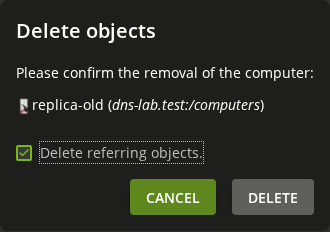
Open UMC → Devices → Computers, select the old Replica and click Delete. Keep Delete referring objects. checked and confirm.
Verification
Run as root on a remaining UCS DNS server. Replace the examples and repeat for every affected forward/reverse zone and remaining DNS server:
ZONE='retire.dns-lab.test'
DNS_IP='10.0.2.15'
dig @"$DNS_IP" "$ZONE" SOA +norecurse
dig @"$DNS_IP" "$ZONE" SOA +norecurse +tcp
dig @127.0.0.1 -p 7777 "$ZONE" AXFR
dig @127.0.0.1 -p 7777 "$ZONE" SOA +short
dig @127.0.0.1 "$ZONE" SOA +short
dig @127.0.0.1 "$ZONE" NS +short
Expect authoritative SOA answers (NOERROR, aa), a complete AXFR (XFR size:, no Transfer failed), matching backend/frontend SOA MNAME and serial, and no obsolete NS targets. Port 7777 checks only the local backend; AXFR success alone does not test the other NS.
Confirm that the old computer and its dedicated host/PTR records are gone, no old NS/SOA references remain, and clients can resolve required services. Do not rely on the UMC success message or dig’s exit code alone.
You can also verify if there are any further objects containing the Servername in the LDAP:
univention-ldapsearch | grep -i replica-old
If verification fails, correct the DNS data before restarting services.